Remote Commands
The SNEWS server allows for several remote commands. Some of these commands are only meant for the developers, and would not work for the regular user. However, there are a few useful functionalities that the user can exploit.
Testing connection
It is often desired to check if a connection to the server is established. The
way we do this with snews_pt is through the following steps;
User sends a message to the regular observation-topic requesting for a feedback
Server catches this message and realizes that this is a “connection test request” and not a supernova observation
Server opens a 3rd stream (1st stream is the observation topic that user writes, server reads, 2nd is the alert stream that server writes, user reads) to feedback the confirmation. This confirmation is a copy of the requested message with only one field changed indicating the “received” operation.
User listens the 3rd topic in the meantime and looks for the message with the altered content.
Once the message is found, the user is prompted with the “confirmation” message.
from snews_pt.remote_commands import test_connection
test_connection()
On CLI
snews_pt test-connection
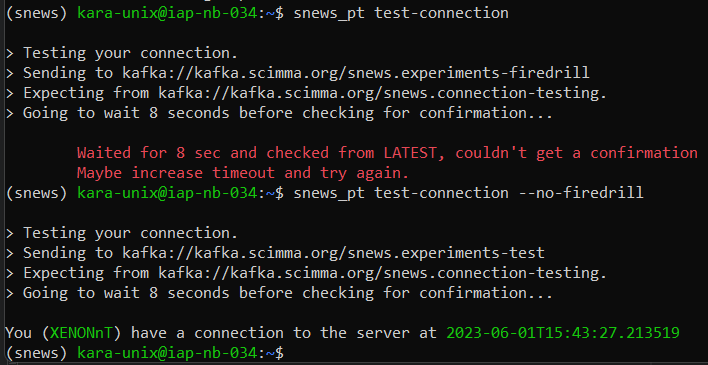
Here snews_pt opens the observation stream and submits the following message with the current timestamp
{
    "_id": "0_test-connection",
    "detector_name": "XENONnT",
    "meta": {},
    "status": "sending",
    "time": "2023-06-01T15:43:27.213519"
}
The snews_cs script running on the server sees this message and modifies the "status" argument to "received" and sends it back
from the 3rd, connection stream.
snews_pt.remote_commands.test_connection() function then waits for a patience seconds (8 by default) before looking into the last messages in the connection stream to make sure there has been enough time for server to read the message and send back the confirmation.
After that it opens and read the messages to see the message with the exact same detector name plus timestamp with an updated "status"="received" key-value pair.
Notice that in the example above, we tested the connection to firedrill and no-firedrill brokers, and only one of them is actively running on the server. Thus, only one of them returned the connection confirmation.
Request Feedback
The member experiments are expected to send frequent heartbeats to SNEWS server. Server keeps the heartbeats for 24(48) hours before deleting them. The heartbeats are also used in case of a triggered supernova alert, to calculate false alarm probability of that alert based on the “alive” detectors at the time.
The heartbeats are never public, and they are deleted from the cache after 24 hours. Within this 24 hours, the user might want to check if their heartbeats are successfully registered, and also see the delays between the operations. In this case user can request a feedback e-mail from the server.
Each heartbeat, similar to observation messages, comes with a “sent timestamp” that snews_pt adds automatically to your message content
at the time of execution. The server also adds a “received timestamp” to each of the heartbeats once they are read at the server.
The two timestamps are then used to measure the latency between the sent and received times.
Furthermore, the server also computes the frequencies of your heartbeats. Once you request a feedback, these informations are visualized on a plot to describe the status of your heartbeats in a plot. If the requesting e-mail address is registered as a contact person for a given experiment, we send this plot by e-mail.
from snews_pt.remote_commands import get_feedback
get_feedback(detector_name="XENONnT", email_address="kara@kit.edu", firedrill=False)
or on CLI
user$: snews_pt get-feedback --no-firedrill
         > Your registered email address: <YOUR MAIL ADDRESS>
         Heartbeat Feedback is requested! Expect an email from us!
We have a list of experiment contact people, and only if the e-mail - experiment combination matches the list we have, we send emails to those addresses.